
Payment Gateway Stripe Dashboard
In the Stripe Payment Gateway there is a dashboard. This is a portal to Stripe payment and other information, not to be confused with the web account dashboard that requires login (https://dashboard.stripe.com/login).
You may not have much need for this unless there appears to be an issue with a payment, or if you use tipping (more on that below).


NOTE: While information on this dashboard is related to eCELLAR, is is fully and completely Stripe and Stripe's information that we have made readily available via the portal [dashboard].
Headings:
Dashboard -
This provides payment data, and most importantly payment status.

Each button allows you to segment a search to help find specific transactions.
The search criteria can be combinatorial.
-
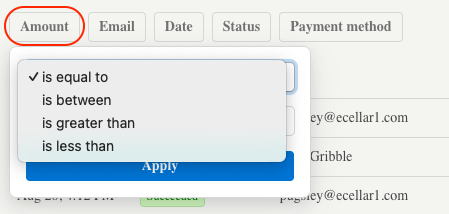
Amount: Search for order amounts exactly or by variables -
-
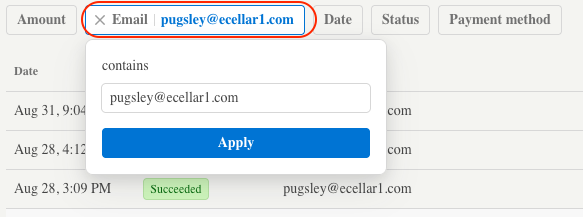
Email: Search by the customer's email address (full email address required) -
-
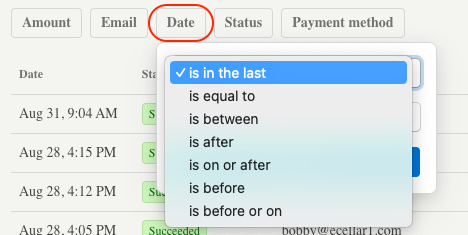
Date: Search by variables relative to a singles date -
-
Status: There are several possible statuses in the drop down.
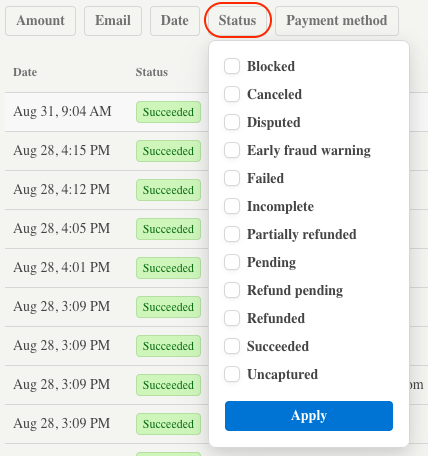
Common status in eCELLAR are as follows:
|
Status |
Definition |
Meaning |
| Succeeded | The payment was successfully processed and completed. | The transaction went through without any issues, and the funds have been transferred to your account. |
| Partially Paid | Only part of the total payment amount was successfully processed. | The transaction isn't fully completed, additional action is required to collect the remaining balance. |
| Refunded | The full amount of the payment has been returned to the customer. | The transaction has been reversed, and the customer has received their money back. |
| Partially Refunded | A portion of the original payment has been refunded to the customer. | The customer has received a partial refund, but not the entire amount of the original transaction. |
| Failed | The payment attempt was unsuccessful. | This could be due to insufficient funds, incorrect card details, or other issues preventing the transaction from going through. |
| Cancelled | The payment was canceled before it was completed. | This can occur if the payment was manually canceled. |
| Uncaptured | The payment was authorized but not captured. | The transaction was approved, but the funds were not transferred. Typically associated with tipping. |
Some less common statuses:
| Blocked | The payment was blocked by Stripe. | Stripe identified the payment as potentially fraudulent or suspicious and automatically blocked it to prevent any potential issues. |
| Failed | The payment attempt was unsuccessful. | This could be due to insufficient funds, incorrect card details, or other issues preventing the transaction from going through. |
| Incomplete | The payment process was started but not completed. | The checkout process was abandoned or or encountered an error before finalizing the payment. |
| Disputed | A dispute, or chargeback, has been raised by the cardholder. | The customer has contested the charge, and the funds are being held while the dispute is resolved. |
| Early Fraud Warning | An alert that the payment may be fraudulent. | Issuing banks have flagged the transaction as potentially fraudulent, and it's under review |
-
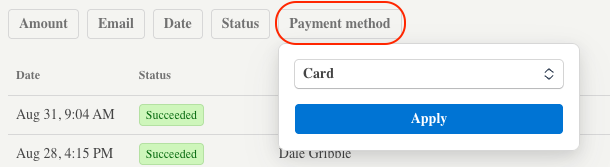
Payment Method: Allows search by card or specific third party payment type in a drop-down menu.
Locations
The POS terminal location from the Company Settings > Locations to which the Payment Gateway is assigned.

Add Location:
IMPORTANT: If your winery ONLY processes MOTO (Mail Order/Telephone Order) transactions, you will need to make a location to assign a reader to.
View a current POS terminal:
Most usually this access point will not be used, as these locations will be created automagically when the user saves a POS Terminal that's assigned to a Stripe gateway, elsewhere in the process.
Readers
The readers and corresponding POS terminals to which they are assigned, and the IP (digital address)

While a reader can be added from here, it is not recommended; the best practice to do so from the Terminal Manager.
Domains
This is part of Phase 2 and will be utilized for ApplePay/GooglePay.
Hardware and Hardware Orders
See this article regarding the types of hardware (Card readers, mounts, etc.) that are available and how to order.